
It’s July. Ops are flat out. 140 supplier invoices are waiting on a voucher amount.
The purchase ledger, without the chasing.
Supvoices matches supplier invoices to your bookings, explains every difference, and takes each query to the person who can fix it.
Supplier invoice matching for tour operators. Bank details checked on every invoice, and every record kept in your own SharePoint.
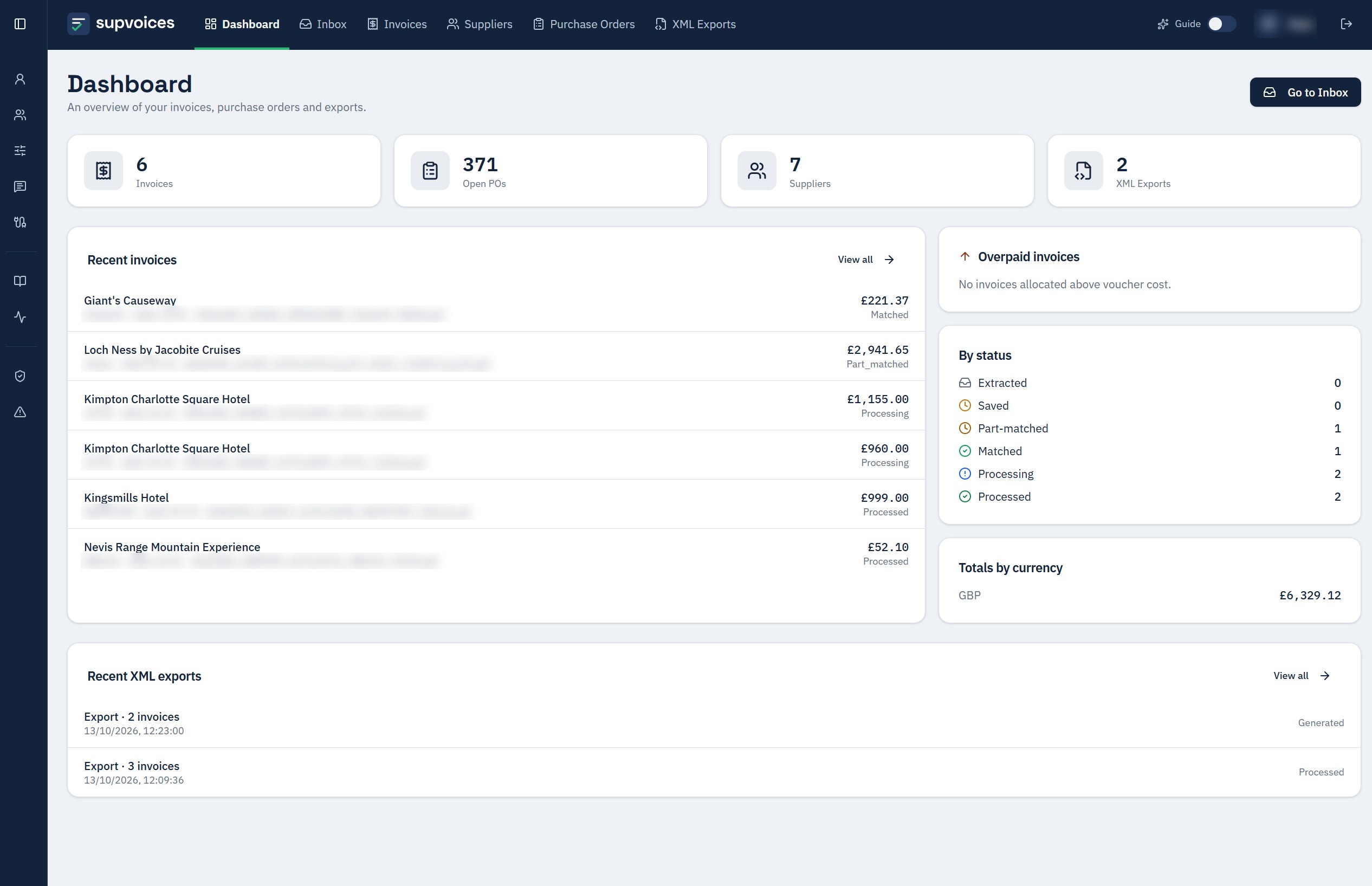
Matching is easy when the numbers agree. The real cost sits in the invoices that don’t, stuck between accounts, operations and the supplier.
Sound familiar?
You know these moments
How it works
Every invoice takes the right path
Supvoices reads each PDF or Word invoice (supplier, lines, VAT, currency, references) and matches it to the open vouchers or purchase orders in your reservation system, with its reasoning shown.
Invoice arrives
Read and matched to open vouchers
Amounts agree: posted automatically for the suppliers you trust, or approved in one click.
Difference found: it goes to whoever can fix it
Ops didn’t update the voucher
Query posted to ops in Microsoft Teams, answered in one click.
Supplier billed what wasn’t agreed
Correction or credit-note request drafted, evidence attached.
Small difference
Rounding, FX or VAT within your buffer closes automatically.
Every decision is logged and reversible, and auto-post is switched on supplier by supplier.
Built-in fraud protection
Bank details checked on every invoice
“We’ve changed banks, please pay our new account.” Supvoices compares the bank details on every supplier invoice with the ones held for that supplier in your reservation system. If they don’t match, the invoice stops there, so a fake or redirected invoice is caught before it reaches a payment run.
Invoice: IBAN ending 4821
Your records: IBAN ending 7730
This invoice can’t go any further until the bank details are checked.
Example
Queries in Teams
Stop chasing ops for voucher amounts
Each mismatch is posted to the right person in Microsoft Teams, with the amounts and vouchers involved. Ops respond in one click between bookings, attach any emails or screenshots, and every reply lands on the invoice.
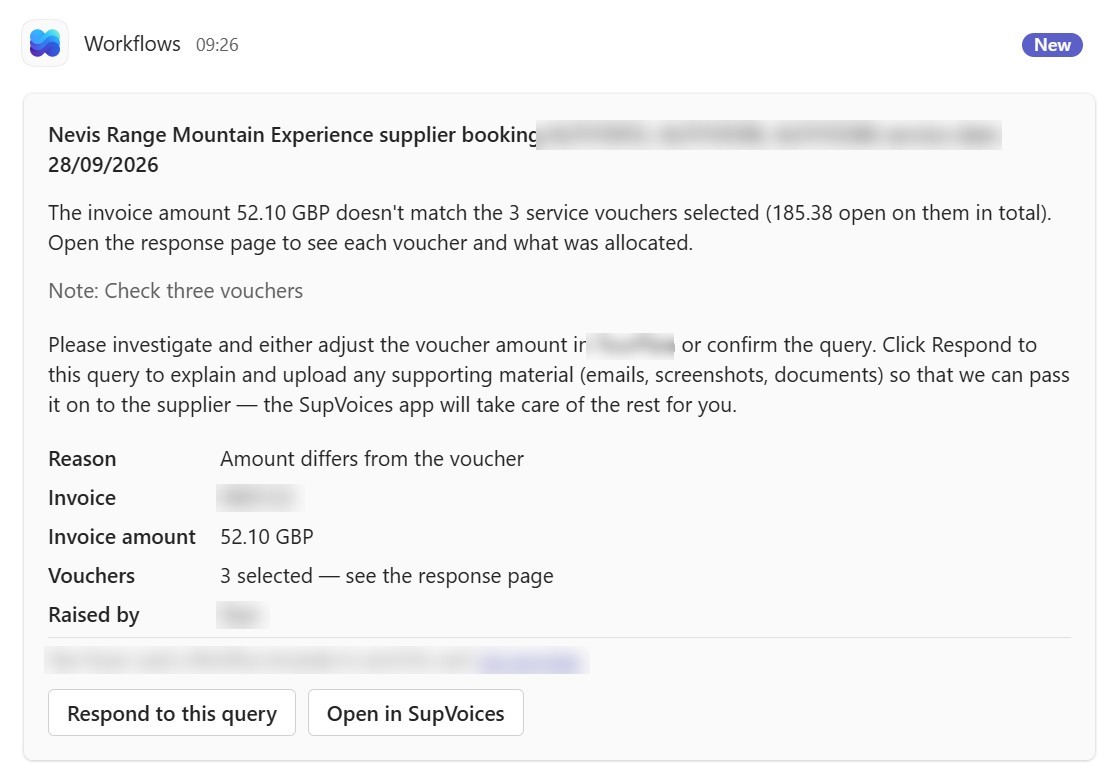
Your team resolves. Supvoices does the rest.
Bank details checked
Every invoice’s bank details are compared with your reservation system. If they don’t match, the invoice can’t go any further.
Clean invoices go straight through
Invoices that agree with the voucher post automatically for the suppliers you trust. Auto-post is switched on supplier by supplier.
Mismatches explained, not just flagged
Every suggestion comes with the reasoning in plain English, next to the original invoice.
Supplier corrections drafted for you
A correction or credit-note request with the evidence attached, sent from your own Outlook domain.
Small differences close themselves
Rounding, FX or VAT differences inside the supplier’s buffer are closed. Anything larger goes to the right person.
Everyone knows where every invoice is
Status, owner and next step for every invoice, so supplier calls end on the first call.
The tricky invoices land on the right desk
Assign or escalate an invoice to a colleague or supervisor in one click, with its full history.
Monthly statements, handled
One invoice covering dozens of bookings with no references is grouped by product and pre-filled.
Overpayments flagged
Anything paid above the booked cost appears on the supervisor dashboard.
Works with your reservation system and Xero
Open vouchers or purchase orders come from your reservation system, approved invoices post straight back to it, and bills flow through to Xero. Nothing is keyed in twice.
Fits Microsoft 365
Queries in Teams, supplier emails from your own Outlook domain, records in your SharePoint. Nobody learns a new inbox.
Nothing to install
It runs in the browser. Staff review a prepared match, so no AI knowledge is needed.
Your records, your SharePoint
Your invoice history never depends on us
Supvoices files the whole life of every invoice in your own SharePoint as it happens. If you ever stopped using Supvoices, everything would already be on your side, and your team would simply carry on by hand with nothing lost.
01
Filed as you work
The invoice, its extracted data, the vouchers or purchase orders it matched, every query and supplier reply, and the full activity history.
02
Easy to find
Clearly named and foldered by month, supplier or booking, with columns you can filter right in SharePoint.
03
A weekly Excel export
Every Monday, all invoices, allocations, queries and activity are exported to Excel, so you keep a complete copy on a regular basis.
04
Managed by your teams
The library sits in your Microsoft 365, under your IT team's permissions. Auditors get one complete place to look.
A win for everyone who touches an invoice
For accounts
Less typing, no chasing.
For operations
One less chore in peak season.
For suppliers
Paid on time, fewer calls.
Built by people who have run purchase ledgers, processed thousands of supplier invoices across many tour operators, and helped finance teams fix the same bottlenecks again and again.
Pricing
Priced on your invoice volume
SETUP
On request
One-off. Connecting your systems, mapping suppliers and setting your rules.
SUBSCRIPTION
On request
Monthly, sized to your invoice volume. Hosting, AI processing, updates and support included.
We’ll quote after a short call about your invoice volume and systems.
Bring a month of supplier invoices
We’ll show you which ones go straight through, and why the rest don’t. Online or in person.